


Shopping Cart (0)
Close
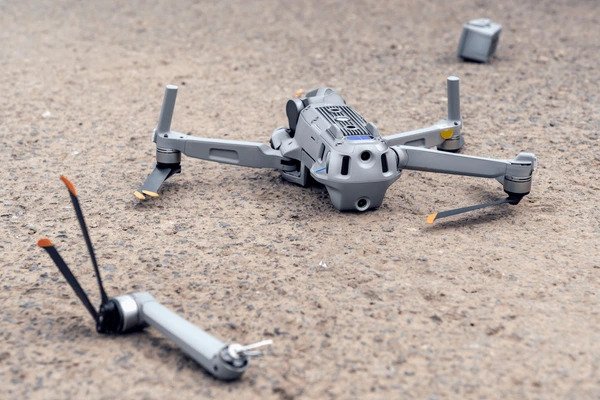
Flying a drone is an exciting experience, but even experienced pilots can face an unexpected crash. A sudden loss of signal, obstacle collision, strong wind, low battery, navigation issue or pilot error can cause a drone to fall or make a hard landing.
If your drone crashes, the most important thing is to stay calm and avoid immediately trying to take off again. Following the right recovery steps can help prevent additional damage and make it easier to identify whether your drone needs professional repair.
If your drone crashes into water or the sea, do not immediately switch it on or try to fly it again. Water can enter the drone’s internal components and cause serious damage.
If your drone falls into normal sea water, remove it from the water as quickly as possible and take it to the nearest professional drone repair center. Avoid powering it on or attempting to test the drone yourself.
If the drone falls into dirty or salty water, gently wash the exterior with normal fresh water to remove salt, dirt, mud, and other contaminants. After cleaning, carefully dry the drone using a hair dryer on a cool or low-heat setting. Do not use excessive heat, as it can damage sensitive components.
Once the drone is cleaned and dried, take it to a professional repair center for inspection before attempting to power it on. A professional inspection can help identify internal water damage that may not be visible from the outside.
The first step after a drone crash is to make sure the area is safe. Do not rush toward the drone if it has landed near roads, power lines, water or other dangerous areas. Once the area is safe, turn off the drone and carefully inspect it.
Look for visible damage to the propellers, arms, motors, camera, gimbal, landing gear and body. Also check whether the battery has been damaged or displaced during the crash. If the battery appears swollen, cracked, punctured or unusually hot, do not continue using or charging it.
A visual inspection can help you understand the severity of the crash.
Check the following components:
Inspect every propeller for cracks, bends, chips or deformation. Even small damage can create vibrations and affect flight stability. Never fly with damaged propellers. Replace them with compatible propellers before attempting another flight.
Check whether the motors rotate normally and whether anything is stuck inside them. Dirt, grass or small debris can sometimes enter the motor after a crash. Do not force a motor to rotate if it feels jammed.
Look closely at the drone’s arms and frame for cracks. A small crack may become worse because of vibration during flight. If the frame or arm is visibly damaged, avoid flying the drone until it has been inspected properly.
The camera and gimbal are among the more sensitive components of a camera drone. Check whether the camera is sitting correctly and whether the gimbal moves normally. Look for unusual vibration, tilted positioning or error messages after powering the drone on.
The battery deserves special attention after a crash. A strong impact can damage the battery even when there is no obvious external damage. If the battery is swollen, punctured, cracked, leaking or generating excessive heat, stop using it.
Never attempt to charge a battery that appears physically damaged. For safety, a damaged drone battery should be handled according to the manufacturer’s battery safety and disposal instructions.
After confirming that there is no obvious physical damage, power on the drone and controller without immediately taking off. Check the flight application for warning messages or error notifications.
Depending on the drone model, you may see alerts related to:
• Motor problems
• Propeller problems
• Gimbal errors
• Compass issues
• Obstacle sensing
• GPS or positioning
• Battery condition
• Flight controller errors
These warnings can provide useful information about what happened during the crash.
If your drone and flight application support flight logs, review the flight data after the crash.
Flight information can sometimes help identify whether the crash was related to signal loss, low battery, high wind, positioning problems, obstacle detection or another issue.
Understanding the cause is important because simply repairing the visible damage may not prevent the same problem from happening again.
Avoid immediately taking the drone back into the air just because it turns on. A drone can appear normal while still having hidden damage. A damaged motor, arm, propeller mount or gimbal can become a bigger problem during flight.
Before flying again, make sure:
Understanding why crashes happen can help pilots prevent future accidents.
Flying until the battery becomes critically low can increase the risk of an emergency landing or loss of control. Always monitor battery percentage and return to a safe landing location before the battery becomes critically low.
Small and lightweight drones can be affected significantly by strong wind. Always check weather conditions before flying and understand your drone’s operating limitations.
Trees, wires, buildings and other obstacles can cause crashes, particularly when flying in unfamiliar locations. Do not rely entirely on obstacle sensing systems. Maintain visual awareness of your surroundings.
Signal interruptions can occur because of environmental conditions, obstacles or interference. Understanding your drone’s return-to-home and failsafe settings is important before every flight.
Inexperienced flying is another common cause of drone crashes. New pilots should practice basic movements and landing techniques in open areas before attempting complex flights.
A drone crash does not always mean that your drone is completely damaged. The most important thing is to approach the situation carefully and inspect the drone systematically. Start by making the area safe, switch off the drone, inspect the propellers and body, check the motors and gimbal, examine the battery and review any error messages or available flight data. Most importantly, do not rush to fly again after a crash. If you are unsure about the condition of your drone, getting it professionally inspected can help identify hidden problems and reduce the risk of another accident.
At Gadget World 08, we help drone enthusiasts and creators choose the right drones, accessories and equipment for their flying needs. Whether you are buying your first camera drone or upgrading your current setup, choosing the right equipment and learning safe flying practices can make your drone experience safer and more enjoyable.
Yes. A drone may continue working after a minor crash, but it should be inspected carefully before flying again because internal or structural damage may not always be visible.
Do not charge the battery if it is swollen, cracked, punctured, leaking or unusually hot. A physically damaged battery should not be used.
It is better not to fly immediately. Inspect the drone, propellers, motors, body, battery and gimbal first and check for warning messages.
If your drone falls into saltwater, muddy water, or dirty water, do not immediately power it on. Carefully remove the drone from the water and, if necessary, gently wash the exterior with normal fresh water to remove salt, dirt, or other contaminants. After washing, allow the drone to dry completely before attempting to power it on.
Regular pre-flight checks, adequate battery management, awareness of weather and obstacles, maintaining visual awareness and learning your drone’s flight and safety features can significantly reduce crash risks.